
USE CASES / MOTOR VEHICLE AI FORM FILLER
Fill Motor Vehicle Forms Faster and Skip the DMV Headache
Simplicity AI helps vehicle owners, dealerships, and fleet managers complete motor vehicle forms accurately in minutes, so paperwork never delays title, registration, or sale.
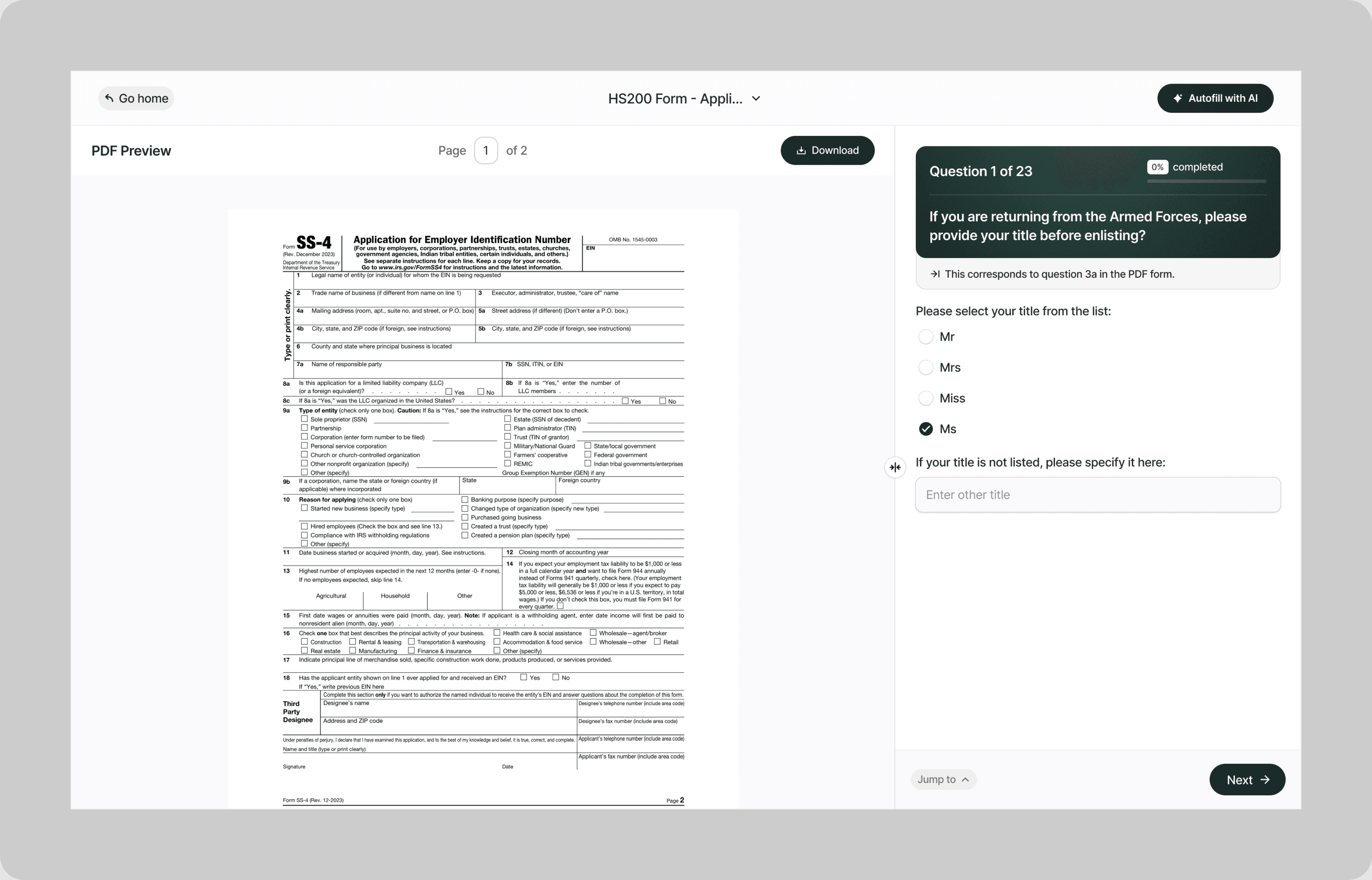
Instead of standing in a DMV line only to find out you filled in the wrong section, brought the wrong documents, or used last year's form, our AI reads your motor vehicle forms and fills them correctly before you ever leave the house.
Whether you're registering a vehicle, transferring a title, applying for a duplicate registration, filing for a planned non-operation, or processing a dealer sale, Simplicity AI handles the paperwork so you can focus on getting on the road.
The Problem with Motor Vehicle Forms
- Every state has its own forms, its own field layouts, and its own supporting document requirements
- Title transfers require exact legal names, lien information, odometer readings, and signatures from both buyer and seller in specific locations
- Registration forms reference vehicle identification numbers, license plate numbers, smog certification dates, and insurance policy details that most people don't have memorized
- One wrong entry or missing signature means the DMV rejects the form and you start the process over, often after waiting in line for an hour
Every rejected form is another trip to the DMV, another day without legal registration, and another risk of driving with expired paperwork. Simplicity AI eliminates these setbacks by converting any motor vehicle form into a guided, error-proof experience.
How Simplicity AI Solves It
- Recognizes motor vehicle form structures across state DMVs, title agencies, and dealer processing systems
- Pulls vehicle details, owner information, and lien data from uploaded documents like titles, registration cards, insurance declarations, or bills of sale
- Maps your information to the correct fields regardless of which state's form you're completing
- Validates every entry for completeness, VIN formatting, date consistency, and signature placement
- Flags missing odometer disclosures, unsigned transfer sections, and fields that don't match your supporting documents
You focus on the vehicle. We handle the DMV.
How to Fill Out Motor Vehicle Forms Online Using Simplicity AI
1
Upload your motor vehicle form PDF to Simplicity AI. The AI scans the document, identifies every field from owner information through vehicle details, lien status, odometer disclosures, and signature blocks, and converts it into a guided questionnaire.
2
Enter the vehicle owner's details: legal name, address, driver's license number, and contact information. If you've used Simplicity AI before, your details carry over, so you're not retyping personal information on every form.
3
Enter the vehicle details: year, make, model, VIN, license plate number, and current odometer reading. Upload your title, registration card, or bill of sale as a source document, and AI automatically pulls vehicle data into the correct fields.
4
Complete the transaction-specific sections. For title transfers, enter buyer and seller information, sale price, and lien details. For registration renewals, confirm insurance and smog compliance. For planned non-operation, enter the effective date and reason. AI shows only the sections that apply to your transaction type.
5
Review the entire form. AI flags missing signatures, VIN formatting errors, odometer discrepancies, and incomplete lien information before you export.
6
Sign electronically and download your completed form as a clean PDF ready to submit to the DMV by mail, drop-off, or in person.
Key Benefits of Using Simplicity AI to Fill Motor Vehicle Forms

Save Time and Effort
Complete DMV forms at home in minutes instead of spending half a day at the counter. No more guessing which section applies to your situation or finding out you needed a document you left on the kitchen table.

Reduce Errors
Catch VIN typos, missing signatures, and incorrect lien information before you submit. The DMV rejects forms for technical errors without mercy. Clean forms get processed. Incomplete forms send you to the back of the line.

Avoid Extra Trips
Submit complete, correct forms the first time. Every rejected DMV form means another visit, another wait, and another day your vehicle isn't legally registered, titled, or transferred.

Stay Organized
Keep your title, registration, insurance documents, bill of sale, smog certificates, and lien release letters in one secure workspace. No more digging through the glove box, filing cabinets, or email looking for the document the DMV counter agent just asked for.
Start Filling Forms the Smart Way
Stop losing days to DMV paperwork. With Simplicity AI, you can complete motor vehicle forms and other important documents quickly, accurately, and confidently, every time. Try Simplicity AI today and experience stress-free form-filling.
FAQs
Frequently Asked Questions About Filling Insurance Forms with Al
What types of motor vehicle forms can I fill out with Simplicity AI?
Simplicity AI works with any motor vehicle form in PDF format. This includes title transfer applications, registration renewals, duplicate title requests, planned non-operation filings, odometer disclosure statements, lien release forms, bill of sale templates, dealer reassignment forms, and power of attorney for vehicle transactions. Upload the PDF, and AI converts it into a guided questionnaire regardless of the state or form type.
How do I fill out a motor vehicle form online for free?
Upload your motor vehicle form PDF to Simplicity AI. Our platform converts the form into an interactive questionnaire that walks you through each section in plain English. Simply visit our website, upload your form, and follow the prompts to complete it in minutes. Try it for free.
Can AI pull vehicle details from my title or registration?
Yes. Upload your current title, registration card, insurance declaration page, or bill of sale as a source file. Simplicity AI extracts the VIN, year, make, model, license plate number, lien holder information, and registered owner details, and automatically populates the correct fields.
Does Simplicity AI work for DMV forms in any state?
Simplicity AI works with any motor vehicle form in PDF format, regardless of the issuing state. Each state's DMV uses different forms and different field layouts, but AI recognizes the structure of each form and maps your information to the correct fields. You just need to upload the correct form for your state.
Can dealerships use Simplicity AI for bulk title processing?
Yes. Dealerships processing high volumes of sales, trade-ins, and title transfers can upload vehicle data and populate forms across multiple transactions. Simplicity AI maps vehicle details, buyer and seller information, and lien data to each form's specific layout, reducing processing time per deal and minimizing the errors that delay title delivery.
How does AI handle odometer disclosures?
Federal law requires an odometer disclosure on every title transfer. Simplicity AI prompts for the current odometer reading, confirms whether it's in miles or kilometers, and flags common issues, such as readings that appear lower than the prior recorded mileage (which would indicate a potential discrepancy that needs explanation). The disclosure is completed as part of the guided form flow.
Is my data safe when filling out motor vehicle forms on Simplicity AI?
Yes. Motor vehicle forms contain driver's license numbers, VINs, lien holder details, sale prices, and personal addresses. Simplicity AI encrypts all documents, handles your data privately, and never shares it with third parties. Your data stays yours.
Common Mistakes When Filling Out Insurance Forms (and How Al Prevents Them)
VIN Typos
A Vehicle Identification Number is 17 characters long, mixing letters and numbers in a sequence that's easy to misread and easier to mistype. One wrong character and the DMV can't match your form to the vehicle. The title transfer fails, the registration gets rejected, or worse, your paperwork accidentally references a completely different vehicle. Simplicity AI validates VIN formatting and length before export, and when you upload your title or registration as a source document, it copies the VIN directly so you don't have to transcribe it by hand.
Missing or Misplaced Signatures
Title transfers typically require signatures from both the buyer and the seller in specific locations on the form. Sign in the wrong spot, and the DMV rejects the transfer. Forget to have the seller sign before they leave, and you're chasing them down afterward. Some forms also require notarized signatures depending on the state. Simplicity AI identifies every signature block, labels who needs to sign where, and won't generate the final PDF until all required signatures are completed.
Incorrect Lien Information
If there's a loan on the vehicle, the lien holder's name and address must appear on the title transfer exactly as they appear in the lender's records. If the loan has been paid off, you need the lien release letter, and the form must reflect that the lien has been satisfied. Submitting a transfer with an active lien listed when the loan is paid off, or with no lien listed when the loan is still active, stalls the entire transaction. Simplicity AI prompts for lien status and flags when lien holder information is missing or incomplete.
Wrong Odometer Reading
Federal law requires an accurate odometer disclosure on every title transfer. Writing 45,000 when the actual reading is 145,000 isn't just an error. It's a federal offense that can result in fines and criminal liability. Transposing digits creates a discrepancy that the DMV or the buyer's lender may flag. Simplicity AI prompts you to verify the odometer reading and flags entries that appear inconsistent with the vehicle's age or prior recorded mileage.
Leaving the Sale Price Blank or Incorrect
Many states use the sale price on the title transfer to calculate sales tax or use tax owed on the transaction. Leaving it blank means the DMV can't process the transfer. Entering a price that's suspiciously low can trigger a tax audit or a reassessment based on the vehicle's fair market value. Simplicity AI flags blank sale price fields and entries that appear significantly below typical values for the vehicle's year and make.
Using a Form from the Wrong State
Each state has its own title and registration forms. Submitting the selling state's form to the buying state's DMV doesn't work. Simplicity AI can't select the right form for you, but once you upload your state's current form, it ensures every field is completed according to that form's structure.
Not Disclosing Vehicle Condition or Damage History
Some states require sellers to disclose known damage, flood history, salvage status, or other material conditions on the title transfer form. Failing to disclose creates legal liability for the seller and can void the transaction for the buyer. Simplicity AI prompts for disclosure fields when they appear on the form and flags them if left blank.
Submitting Without Required Supporting Documents
Title transfers often require a smog certificate, a lien release letter, a bill of sale, a power of attorney, or proof of insurance. Submitting the form without the required attachments means the DMV can't process the transaction. Simplicity AI generates a document checklist based on the form type and your transaction, so you know exactly what to bring or mail with your submission.

AI tax form filler
Immigration form ai filler
POPULAR FORMS
Popular forms ready for you to fill Instantly
Find commonly used government, legal, and official documents, already optimized for fast, stress-free filling with Simplicity AI. We’ve made them easier, smarter, and faster so you can move on with your day.
Tax Forms
Immigration Forms
Healthcare Forms
Employment Forms
Legal Forms
Motor Vehicle Forms
Experience instant PDF form filling with AI
