
USE CASES / LEGAL AI FORM FILLER
Fill Legal Forms Faster and Without the Billable Hours
Simplicity AI helps individuals, businesses, and legal professionals complete legal forms accurately in minutes, so the paperwork never delays the process.
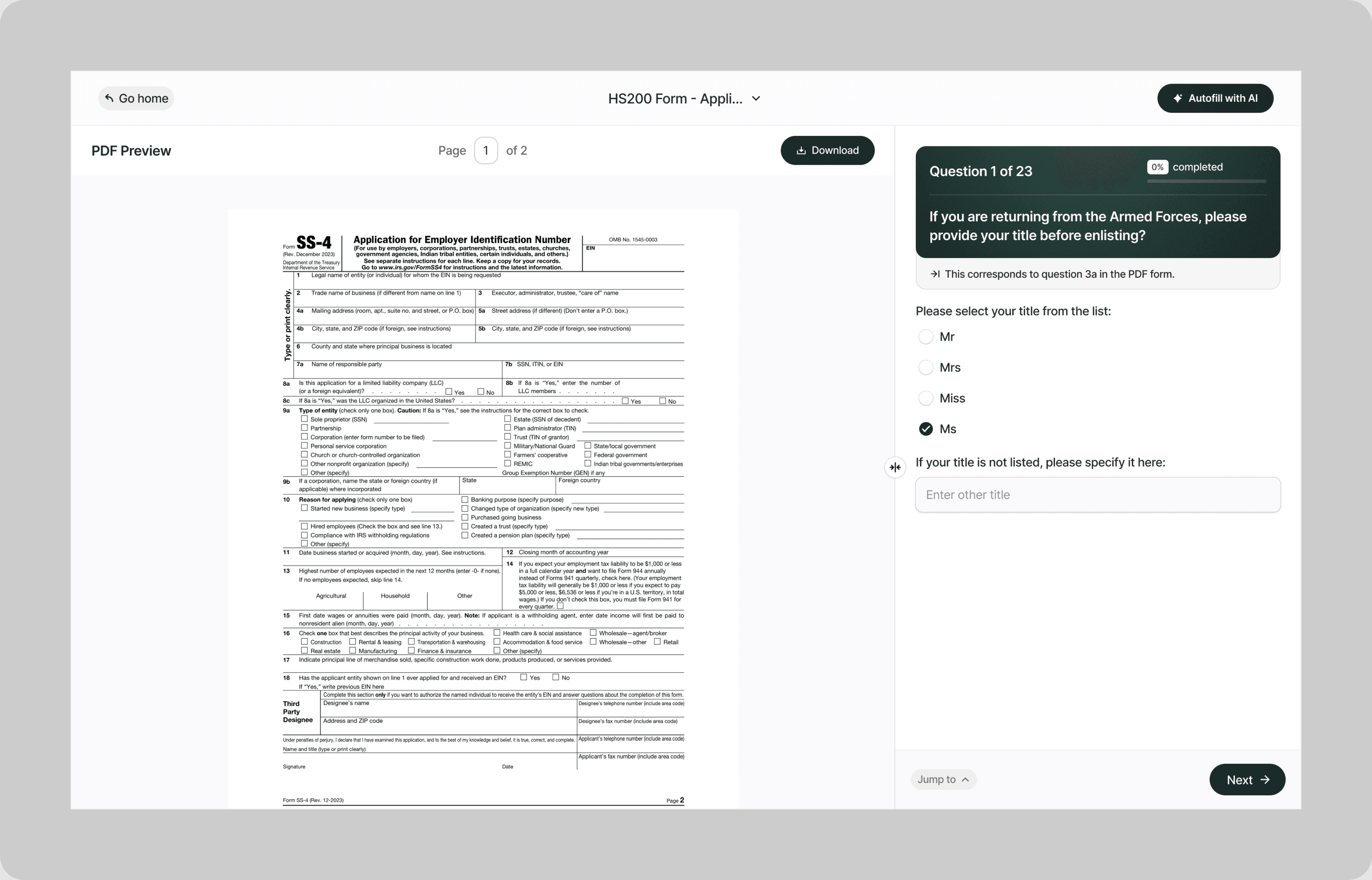
Instead of paying an attorney $300 an hour to fill in fields you could complete yourself, or spending a weekend deciphering legal language that was written for lawyers and not for the people the forms affect, our AI reads your legal documents and fills them correctly the first time.
Whether you're filing a court motion, submitting a small claims petition, completing a power of attorney, processing a name change, or responding to a legal notice, Simplicity AI handles the paperwork so you can focus on your case.
The Problem with Legal Forms
- Every jurisdiction has its own forms, its own formatting rules, and its own filing requirements
- Legal terminology is deliberately precise, and one wrong term or checked box can change the meaning of your entire filing
- Courts reject filings for technical errors that have nothing to do with the merits of your case
- Deadlines are strict, and a form filed one day late can forfeit your legal rights entirely
One formatting error, one missed checkbox, or one unsigned page doesn't just delay your case. It can result in dismissal, default judgment against you, or loss of legal protections you didn't know you had. Simplicity AI removes these risks by converting any legal form into a guided, plain-English experience.
How Simplicity AI Solves It
- With Simplicity AI, legal paperwork stops being the barrier between you and the outcome you need. Our AI:
- Recognizes legal form structures across court filings, contracts, petitions, declarations, and government submissions
- Pulls party names, case numbers, dates, and filing details from uploaded documents like prior filings, court notices, or attorney correspondence
- Maps your information to the correct fields regardless of which jurisdiction's form you're completing
- Validates every entry for completeness, formatting, and internal consistency across sections
- Flags missing signatures, incomplete declarations, and fields that conflict with other entries on the same form
You focus on your case. We handle the forms.
How to Fill Out Legal Forms Online Using Simplicity AI
1
Upload your legal form PDF to Simplicity AI. The AI scans the document, identifies every field from party information through declarations, certifications, and signature blocks, and converts it into a guided questionnaire.
2
Enter your personal or business details: legal name, address, phone number, and case number (if applicable). If you've used Simplicity AI before, your details carry over so you're not retyping the same information on every filing.
3
Complete the form-specific sections. For court filings, enter case details, opposing party information, and the relief you're requesting. For contracts, enter party names, terms, and effective dates. For petitions, enter the grounds and supporting facts. AI walks through each section in plain English with no legal jargon left unexplained.
4
Upload supporting documents as source files, including prior court filings, notices, contracts, identification documents, and attorney correspondence. AI populates case numbers, party names, dates, and filing details into the correct fields, so you don't have to retype from a court notice.
5
Review the entire form. AI flags missing fields, unsigned declarations, date inconsistencies, and formatting errors that could result in rejection before you export.
6
Sign electronically and download your completed form as a clean PDF ready to file with the court, submit to an attorney, or serve on the opposing party.
Key Benefits of Using Simplicity AI to Fill Legal Forms

Save Time and Effort
Complete complex legal filings in minutes instead of hours. No more reading 20-page instruction packets, cross-referencing court rules, or starting over because you used the wrong form for your jurisdiction.

Reduce Errors
Catch missing fields, formatting violations, and inconsistencies before you file. Courts don't care why your form is incomplete. They reject it and reset your deadline. Clean forms get processed. Incomplete forms get returned.

Avoid Costly Rejections
Every rejected filing costs time, and in legal matters, time is often the one thing you can't afford to lose. AI validates your form against the fields the court expects, so your filing is accepted the first time you submit it.

Stay Organized
Keep your case documents, court forms, correspondence, and supporting evidence in one secure workspace. No more searching through folders, emails, and kitchen tables for the document the court clerk requested.
Start Filling Forms the Smart Way
Stop risking your case over paperwork technicalities. With Simplicity AI, you can complete legal forms and other important documents quickly, accurately, and confidently, every time. Try Simplicity AI today and experience stress-free form-filling.
FAQs
Frequently Asked Questions About Filling Insurance Forms with Al
What types of legal forms can I fill out with Simplicity AI?
Simplicity AI works with any legal form in PDF format. This includes court filings, small claims petitions, powers of attorney, name change petitions, contract forms, affidavits, declarations, traffic court submissions, landlord-tenant forms, family law filings, corporate governance documents, and regulatory submissions. Upload the PDF, and AI converts it into a guided questionnaire regardless of court or jurisdiction.
How do I fill out a legal form online for free?
Upload your legal form PDF to Simplicity AI. Our platform converts the form into an interactive questionnaire that walks you through each section in plain English. Simply visit our website, upload your form, and follow the prompts to complete it in minutes. Try it for free.
Can AI pull case details from court notices or prior filings?
Yes. Upload any court document, notice, prior filing, or attorney correspondence as a source file. Simplicity AI extracts case numbers, party names, court names, filing dates, and other relevant details, and automatically populates the correct fields. You verify and adjust, rather than retyping from a court notice.
Does Simplicity AI provide legal advice?
No. Simplicity AI is a form-filling tool, not a law firm. It helps you complete legal forms accurately and efficiently, but it does not provide legal advice, interpret laws, or recommend legal strategies. If you need legal guidance, consult a licensed attorney. If you need your forms filled out correctly, that's where we come in.
How does AI handle different court jurisdictions?
Every jurisdiction has its own forms with its own field structures, formatting requirements, and filing rules. Simplicity AI recognizes the format of each form and maps your information to the correct fields. If a form requires jurisdiction-specific entries, such as court department numbers, division codes, or local filing fees, AI prompts you for those details.
Can legal professionals use Simplicity AI for bulk filings?
Yes. Paralegals, legal assistants, and attorneys handling high-volume filings can upload case documents and populate forms across multiple matters and jurisdictions. Simplicity AI maps case data to each court's specific form layout, reducing preparation time per filing and minimizing errors across your caseload.
Is my data safe when filling out legal forms on Simplicity AI?
Yes. Legal forms contain highly sensitive information, including case numbers, financial disclosures, criminal history, personal declarations, and information filed under penalty of perjury. Simplicity AI encrypts all documents, handles your data privately, and never shares it with third parties. Your data stays yours.
Common Mistakes When Filling Out Insurance Forms (and How Al Prevents Them)
Filing the Wrong Form for Your Jurisdiction
Every court has its own approved forms. A family law petition from Los Angeles County won't be accepted in San Diego County if San Diego uses a different local form or requires additional attachments. Filing the wrong form wastes time. The court clerk rejects it, your filing date doesn't count, and your deadline may have passed by the time you refile with the correct version. Simplicity AI can't select the right form for you, but once you upload the correct one, it ensures every field is completed according to that form's structure.
Inconsistent Party Names Across Related Filings
Your petition says "John A. Smith." Your declaration says "John Smith." Your proof of service says "J. Smith." The court now has three different versions of the same party name across related documents, which can cause confusion, processing delays, or challenges from the opposing party. Simplicity AI locks party names across all forms in a filing set to ensure consistency everywhere.
Missing or Incomplete Proof of Service
You completed the form perfectly, filed it on time, and then forgot to serve the other party or forgot to file the proof of service. Without proof that the opposing party received the documents, the court can't proceed. Many cases stall not because of the substance of the filing but because the proof of service was incomplete, unsigned, or never submitted. Simplicity AI flags proof-of-service requirements and ensures that the server's details, method, date, and signature are completed.
Leaving Declaration Sections Vague
Legal declarations require specific facts, dates, and details. Writing "the landlord has not maintained the property" doesn't give the court enough to act on. The court needs "On January 15, 2025, I notified the landlord in writing about a broken heater. As of February 19, 2025, no repairs have been made." Simplicity AI prompts you with targeted questions about dates, actions taken, and specific facts so your declaration is detailed enough to support your case.
Unsigned or Improperly Signed Documents
A form signed in the wrong place, signed by the wrong person, or missing a signature entirely gets rejected. Some forms require notarization, some require a declaration under penalty of perjury, and some require both. Simplicity AI identifies every signature block on the form, specifies the required signature type, and won't generate the final PDF until all signatures are completed.
Missing Filing Deadlines
Legal deadlines are absolute. A response to a lawsuit filed one day late can result in a default judgment against you. A motion filed after the court's cutoff date gets denied without consideration of the merits. Simplicity AI can't track your court deadlines, but it helps you complete and export the form the same day, so the paperwork isn't the reason you miss the filing window.
Not Attaching Required Exhibits or Supporting Documents
Many court filings require exhibits, such as contracts, photographs, correspondence, financial records, or other evidence referenced in the form. Filing without the required attachments means the court can't consider the evidence that supports your case. Some courts reject the entire filing if required exhibits are missing. Simplicity AI generates an attachment checklist based on what the form references, so you know what to include before you submit.
Using Outdated Legal Forms
Courts revise their forms periodically to reflect changes in law, procedure, or local rules. Submitting a form that was last updated three years ago, when the court has since added new required fields or changed the form, means your filing gets rejected on a technicality that has nothing to do with the merits of your case. Always upload the most current version of the form to Simplicity AI.

Employment form ai filler
Application form ai filler
POPULAR FORMS
Popular forms ready for you to fill Instantly
Find commonly used government, legal, and official documents, already optimized for fast, stress-free filling with Simplicity AI. We’ve made them easier, smarter, and faster so you can move on with your day.
Tax Forms
Immigration Forms
Healthcare Forms
Employment Forms
Legal Forms
Motor Vehicle Forms
Experience instant PDF form filling with AI
