
USE CASES / JOB APPLICATION AI FORM FILLER
Fill Job Application Forms Faster and Land the Interview
Simplicity AI helps job seekers, employers, and HR teams complete application forms accurately in minutes, so paperwork never delays the hire.
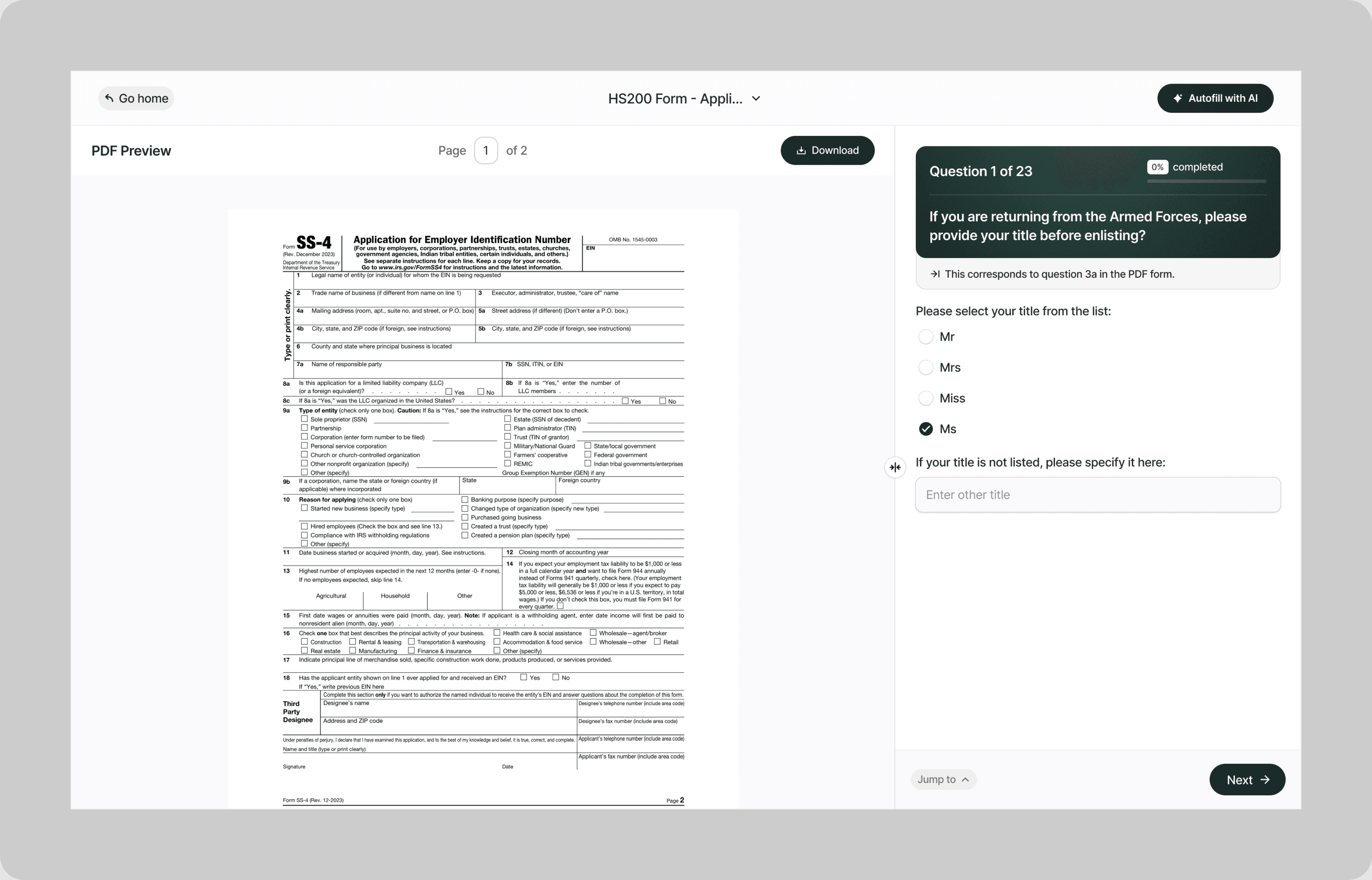
Instead of retyping the same work history, education details, and references into every application, our AI reads your documents and fills the fields for you, accurately and automatically.
Whether you're applying for a federal position, a corporate role, a government contract job, or a part-time opening, Simplicity AI handles the paperwork so you can focus on preparing for the interview.
The Problem with Job Application Forms
- Job application forms are rarely as simple as uploading a resume:
- Every employer uses a different format, layout, and field structure
- Forms ask for the same information in different ways across different sections
- Employment history requires exact dates, addresses, supervisor names, and salary figures going back 10+ years
- One incomplete field or formatting error can disqualify your application before a human ever reads it
Every form you abandon or submit with errors is an opportunity that slips away. Simplicity AI removes the friction by converting any application form into a guided, step-by-step experience.
How Simplicity AI Solves It
- With Simplicity AI, the application form is no longer the bottleneck between you and the job. Our AI:
- Recognizes application form structures across federal, state, corporate, and standardized formats
- Pulls your name, work history, education, certifications, and references from uploaded resumes or prior applications
- Maps your information to the correct fields regardless of which employer's form you're completing
- Validates every entry for completeness, date formatting, and consistency across sections
- Flags gaps in employment history, missing supervisor details, and unsigned authorization sections
You focus on the opportunity. We handle the paperwork.
How to Fill Out Job Application Forms Online Using Simplicity AI
1
Upload your job application form PDF to Simplicity AI. The AI scans the document, identifies every field from personal information through employment history, education, references, and authorization signatures, and converts it into a guided questionnaire.
2
Enter your personal details: name, address, phone number, email, and Social Security number (if required). If you've used Simplicity AI before, your details carry over, so you're not retyping the basics on every application.
3
Enter your employment history. Upload your resume or a prior application as a source document, and the AI automatically populates job titles, employer names, dates, addresses, supervisor details, and salary information into the correct fields. AI flags any gaps between positions so you can address them before submission.
4
Enter your education and certifications: schools attended, degrees earned, graduation dates, and any professional licenses or certifications. AI formats dates and degree types consistently across all sections of the form.
5
Add your references, skills, and any supplemental sections required by the form, such as availability, desired salary, veteran status, voluntary disclosures, or additional qualifications. AI shows only the sections that the specific form includes.
6
Review the entire application. AI flags missing fields, inconsistent dates, and unsigned sections before you export. Sign electronically and download your completed application as a clean PDF ready to submit.
Key Benefits of Using Simplicity AI to Fill Job Application Forms

Save Time and Effort
Complete lengthy application forms in minutes instead of hours. No more retyping your work history, education, and references from scratch for every new opening.

Reduce Errors
Catch missing fields, date gaps, and formatting inconsistencies before you submit. A clean application gets reviewed. An incomplete one gets filtered out.

Stand Out Faster
Submit polished, error-free applications that don't get flagged by automated screening systems or rejected by HR for missing information. The faster you apply, the earlier your name lands on the hiring manager's desk.

Stay Organized
Keep your resumes, application forms, reference lists, and supporting documents in one secure workspace. No more scrambling to find a former supervisor's phone number or your start date from three jobs ago.
Start Filling Forms the Smart Way
Stop losing opportunities to tedious paperwork. With Simplicity AI, you can complete job applications and other important forms quickly, accurately, and confidently, every time. Try Simplicity AI today and experience stress-free form-filling.
FAQs
Frequently Asked Questions About Filling Insurance Forms with Al
What types of job application forms can I fill out with Simplicity AI?
Simplicity AI works with any job application form in PDF format. This includes federal government applications, state and municipal application forms, corporate standardized applications, staffing agency intake forms, background check authorizations, and supplemental questionnaires. Upload the PDF, and AI converts it into a guided questionnaire regardless of the employer or format.
How do I fill out a job application form online for free?
Upload your application form PDF to Simplicity AI. Our platform converts the form into an interactive questionnaire that walks you through each section. Simply visit our website, upload your form, and follow the prompts to complete it in minutes. Try it for free.
Can AI pull my work history from my resume?
Yes. Upload your resume, a prior application, or any document containing your employment history as a source file. Simplicity AI extracts job titles, employer names, employment dates, addresses, supervisor details, and salary information, and automatically populates the correct fields. You review and adjust instead of retyping from scratch.
Will AI fill in the same information across multiple applications?
Yes. Once you've entered your details or uploaded source documents, Simplicity AI carries your personal information, work history, education, and references with you to every new application you complete. Each form receives the same accurate data, mapped to its specific field layout, without manual re-entry.
How does AI handle employment gaps?
Simplicity AI compares the end date of each position against the start date of the next. If there's a gap, AI flags it before you export so you can add an explanation (education, caregiving, freelance work, medical leave) rather than submitting a form with unexplained holes that raise questions for the hiring manager.
Can recruiters and HR teams use Simplicity AI for multiple candidates?
Yes. Recruiters and staffing agencies can upload candidate documents and populate application forms across multiple clients and positions. Simplicity AI maps candidate data to each employer's specific form layout, reducing processing time per placement and minimizing errors across your pipeline.
Is my data safe when filling out job applications on Simplicity AI?
Yes. Job application forms contain sensitive information, including Social Security numbers, employment history, salary details, and personal references. Simplicity AI encrypts all documents, handles your data privately, and never shares it with third parties. Your data stays yours.
Common Mistakes When Filling Out Insurance Forms (and How Al Prevents Them)
Leaving Employment History Fields Incomplete
Application forms don't just want your job title and company name. They want exact start and end dates, full employer addresses, supervisor names, phone numbers, reasons for leaving, and salaries for each position. Leaving any of these blank signals carelessness to the hiring manager or triggers an automatic rejection in applicant tracking systems. Simplicity AI flags every incomplete employment history field before you export.
Inconsistent Dates Between Resume and Application
Your resume says you worked at Company X from 2019 to 2022. The application form asks for the month and year, and you enter March 2019 to January 2023 because you're guessing. Your application no longer matches your resume, and the background check flags the discrepancy. Simplicity AI pulls dates directly from your uploaded resume, so the application and the resume tell the same story.
Unexplained Gaps in Employment
A two-year gap between positions with no explanation is a red flag for any reviewer. Whether you were in school, caring for a family member, freelancing, traveling, or dealing with a health issue, the application form is where you address it. Leaving the gap blank and hoping nobody notices doesn't work. Simplicity AI identifies gaps in dates between positions and prompts you to provide an explanation before submitting.
Wrong or Outdated Contact Information for References
You list your former manager as a reference, but enter the phone number from three years ago. The employer calls, the line disconnects, and your reference check stalls. Some employers move on to the next candidate instead of following up with your references. Simplicity AI prompts you to verify reference contact details each time you use them on a new application.
Not Reading the Authorization and Disclosure Sections
Most application forms include background check authorization, at-will employment acknowledgment, truthfulness certification, and other legal disclosures. Skipping these or leaving them unsigned renders your application legally incomplete and prevents processing. Simplicity AI highlights every signature and authorization field and won't let you export until they're completed.
Applying with the Wrong Form Version
Some employers update their application forms annually or when policies change. Submitting last year's version when the employer has added new required fields means your application is incomplete before a human ever sees it. Always upload the most current version of the form to Simplicity AI.
Submitting Without Proofreading
Typos in your employer name, misspelled references, or a transposed digit in your phone number are small errors that create big problems. If the hiring manager can't reach you because your phone number is wrong, you don't get the interview. Simplicity AI validates formatting and flags entries that don't match expected patterns, but a final human review before export catches the things only your eyes can see.
Forgetting to Tailor Supplemental Sections
Many application forms include open-ended sections for additional qualifications, skills, or statements. Leaving these blank or copying the same generic paragraph into every application wastes the one section where you can differentiate yourself. Simplicity AI prompts you to complete supplemental sections and reminds you to tailor your responses to each specific role.

Insurance ai form filler
Employment form ai filler
POPULAR FORMS
Popular forms ready for you to fill Instantly
Find commonly used government, legal, and official documents, already optimized for fast, stress-free filling with Simplicity AI. We’ve made them easier, smarter, and faster so you can move on with your day.
Tax Forms
Immigration Forms
Healthcare Forms
Employment Forms
Legal Forms
Motor Vehicle Forms
Experience instant PDF form filling with AI
