
USE CASES / IMMIGRATION AI FORM FILLER
Fill Immigration Forms Faster and File Without Fear
Simplicity AI helps immigrants, petitioners, and immigration professionals complete immigration forms accurately in minutes, so a paperwork mistake never puts your case at risk.
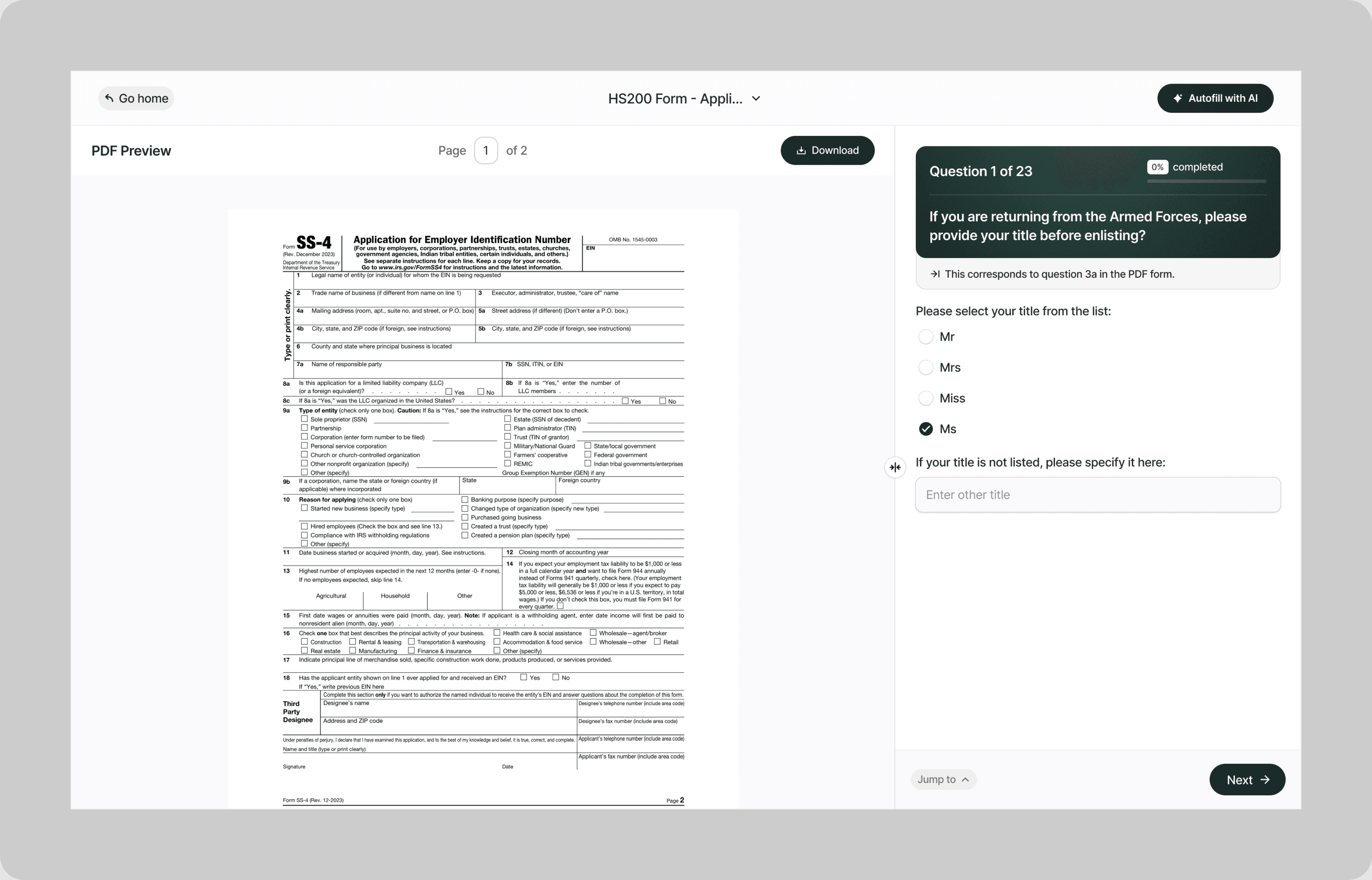
Instead of spending weeks deciphering USCIS instructions, second-guessing which sections apply to your situation, and worrying that one wrong answer could derail your entire case, our AI reads your immigration forms and fills them correctly the first time.
Whether you're filing a family-based petition, applying for naturalization, renewing a green card, requesting employment authorization, sponsoring an employee, or responding to a Request for Evidence, Simplicity AI handles the paperwork so you can focus on building your life in the United States.
The Problem with Immigration Forms
- USCIS forms are notoriously long, with some running 20+ pages of questions, supplements, and addenda
- Every form has its own edition date, and submitting an outdated version results in automatic rejection and a lost filing fee
- Questions are repetitive, asking for the same address, employment, and travel history in slightly different formats across multiple sections
- A single inconsistency between your form and your supporting documents can trigger a Request for Evidence, delay processing by months, or result in a denial
Every rejected filing means lost time, lost filing fees (often hundreds of dollars), and potentially lost immigration status. In some cases, a denial can trigger removal proceedings. Simplicity AI removes these risks by converting any immigration form into a guided, plain-English experience.
How Simplicity AI Solves It
- Recognizes immigration form structures across USCIS petitions, applications, supplements, and Department of State forms
- Pulls your biographical details, employment history, travel records, and prior filing information from uploaded documents like passports, prior approvals, I-94 records, or employment letters
- Maps your answers to the correct fields regardless of which form you're completing or how many supplements it requires
- Validates every entry for completeness, date formatting, consistency across sections, and alignment with the form's current edition
- Flags missing signatures, blank required fields, date gaps in employment or residence history, and answers that contradict other sections of the same form
You focus on your future. We handle the forms.
How to Fill Out Immigration Forms Online Using Simplicity AI
1
Upload your immigration form PDF to Simplicity AI. The AI scans every page, including supplements and addenda, identifies every field from biographical information through immigration history, employment records, and signature blocks, and converts it into a guided questionnaire.
2
Enter your biographical details: legal name, date of birth, country of birth, nationality, A-Number (if applicable), and current immigration status. If you've used Simplicity AI before, your details carry over, so you're not reentering the same personal history on every new form.
3
Enter your address history, employment history, and travel history. Upload your passport, prior approval notices, I-94 records, or employment letters as source documents, and AI pulls dates, addresses, employer names, and entry/exit records into the correct fields automatically. AI flags any gaps in your timelines before you move to the next section.
4
Complete the form-specific sections. For petitions, enter beneficiary details and the basis for eligibility. For applications, enter the specific benefit you're seeking. For supplements, AI determines which ones are required based on your answers and generates them automatically. AI walks through each section in plain English.
5
Review the entire form, including all supplements and addenda. AI checks every field for completeness, validates date formatting, flags contradictions between sections, and confirms the form matches the current USCIS edition date.
6
Sign electronically and download your completed form as a clean PDF ready to mail to the correct USCIS lockbox, service center, or field office, or to file online where electronic filing is available.
Key Benefits of Using Simplicity AI to Fill Immigration Forms

Save Time and Effort
Complete 20-page immigration forms in minutes, not days. No more rewriting the same address history, employment timeline, and travel log across multiple sections and supplements that ask for the same information in different formats.

Reduce Errors
Catch missing fields, date inconsistencies, and contradictory answers before you file. USCIS doesn't give the benefit of the doubt. They reject, deny, or issue RFEs. Clean forms get approved. Incomplete forms get sent back with your filing fee gone.

Protect Your Filing Fee
USCIS filing fees range from $50 to over $1,000, depending on the form. If your submission is rejected for using an outdated edition, missing a required signature, or leaving a required field blank, you will lose the fee and have to start over. AI validates your form against the current edition requirements before you submit.

Stay Organized
Keep your passport copies, prior approvals, I-94 records, employment letters, financial documents, and supporting evidence in one secure workspace. No more scrambling to find the document your attorney or USCIS officer requested.
Start Filling Forms the Smart Way
Stop risking your immigration case over paperwork errors. With Simplicity AI, you can complete immigration forms and other important documents quickly, accurately, and confidently, every time. Try Simplicity AI today and experience stress-free form-filling.
FAQs
Frequently Asked Questions About Filling Insurance Forms with Al
What types of immigration forms can I fill out with Simplicity AI?
Simplicity AI works with any immigration form in PDF format. This includes USCIS forms (I-130, I-485, I-765, I-131, I-140, I-129, N-400, I-90, I-751, I-864), Department of State forms (DS-160, DS-260, DS-82, DS-11), and Department of Labor forms (ETA-9089). Upload the PDF, and AI converts it into a guided questionnaire regardless of form type or filing category.
How do I fill out an immigration form online for free?
Upload your immigration form PDF to Simplicity AI. Our platform converts the form into an interactive questionnaire that walks you through each section in plain English. Simply visit our website, upload your form, and follow the prompts to complete it in minutes. Try it for free.
Can AI pull my information from my passport or prior approval notices?
Yes. Upload your passport, prior I-797 approval notices, I-94 records, employment letters, or any document containing your biographical and immigration details as a source file. Simplicity AI extracts names, dates of birth, passport numbers, A-Numbers, entry dates, and status information, and automatically populates the correct fields.
How does AI handle the supplements and addenda that USCIS forms require?
Many USCIS forms require additional supplements based on your answers (for example, Part 12 of Form I-485 requires Supplement A for address history beyond what fits on the main form). Simplicity AI determines which supplements are required based on your entries and automatically generates them. Your address, employment, or travel history flows from the main form into the supplement without re-entry.
Does Simplicity AI check that I'm using the correct form edition?
USCIS rejects any form that isn't the current edition, and your filing fee is not refunded. Simplicity AI flags the edition date on the form you upload. However, always verify you're downloading the most current version from the USCIS website before uploading to ensure your filing isn't rejected on a technicality.
Can immigration attorneys use Simplicity AI for multiple clients?
Yes. Attorneys and paralegals managing multiple cases can upload client documents and populate forms across different case types and filing categories. Simplicity AI maps each client's biographical data, immigration history, and employment details to the appropriate form fields, reducing preparation time per case and identifying cross-section inconsistencies that trigger RFEs.
Is my data safe when filling out immigration forms on Simplicity AI?
Yes. Immigration forms contain passport numbers, A-Numbers, Social Security numbers, immigration status details, employment history, financial records, and family information. Simplicity AI encrypts all documents, handles your data privately, and never shares it with third parties. Your data stays yours.
Common Mistakes When Filling Out Insurance Forms (and How Al Prevents Them)
Using an Outdated Form Edition
USCIS updates forms regularly, and each form includes an edition date in the bottom left corner. If you download a form from a third-party website or use a version you saved six months ago, it's likely expired. USCIS rejects outdated editions automatically and does not refund your filing fee. On a form like the I-485 with a $1,225 fee, that's an expensive mistake. Simplicity AI flags the edition date on your uploaded form, but always download the latest version directly from uscis.gov before uploading.
Gaps in Address, Employment, or Travel History
USCIS requires a continuous timeline for your address history (typically 5 years), employment history (typically 5-10 years), and travel history (varies by form). If there's a three-month gap between the address you left in June and the address you moved into in September, USCIS wants to know where you were for those three months. Unexplained gaps trigger RFEs or, worse, suspicion that you're hiding something. Simplicity AI compares end dates against start dates across every timeline entry and flags gaps before you submit.
Inconsistent Answers Between Sections
Form I-485 is 18 pages long. Your name appears in Part 1. Your address appears in Parts 1, 3, and Supplement A. Your employment appears in Parts 4 and 7. If the name in Part 1 doesn't match Part 7 because you used a middle initial in one and your full middle name in the other, USCIS flags the inconsistency. Simplicity AI locks repeated fields across all sections so every instance of your name, address, and dates matches exactly.
Wrong or Missing A-Number
Your Alien Registration Number (A-Number) is your unique USCIS identifier. If you have one and don't include it, USCIS may not be able to link your new filing to your existing case history. If you enter the wrong number, your filing could be associated with someone else's record. Simplicity AI validates A-Number formatting (a nine-digit number preceded by "A") and cross-checks it against other identifiers on the form.
Not Signing Every Required Signature Block
Most USCIS forms have multiple signature blocks: one for the applicant, one for the interpreter (if used), one for the preparer (if someone helped you), and sometimes one for the petitioner or sponsor. Missing any one of them results in rejection. Simplicity AI identifies every signature block on the form and won't generate the final PDF until all required signatures are completed.
Sending the Form to the Wrong Filing Location
USCIS has multiple lockbox facilities, service centers, and field offices, and the correct filing location depends on which form you're filing, what category you're filing under, and where you live. Sending your I-130 to the California Service Center when it should go to the Texas lockbox means your filing sits in the wrong facility until someone reroutes it, adding weeks or months to your processing time. Simplicity AI can't select the filing location for you, but it can help you complete and export the form quickly so you have time to verify the correct address on the USCIS website before mailing.
Insufficient Financial Evidence on Affidavit of Support
Form I-864 (Affidavit of Support) requires the sponsor to demonstrate income at or above 125% of the federal poverty guidelines for their household size. Submitting the I-864 without tax transcripts, employment letters, or asset documentation to prove you meet the threshold results in an RFE or denial. Many sponsors submit their most recent tax return, but forget that USCIS wants three years of returns plus current employment verification. Simplicity AI prompts for all required financial documentation based on the household size and income level you enter.
Omitting Required Photographs or Biometric Information
Many USCIS forms require passport-style photographs meeting specific dimensions, background color, and recency requirements. Submitting photos that are too old, the wrong size, or taken against the wrong background results in the package being returned. Simplicity AI flags photo requirements when they apply to the form you're completing and specifies the exact USCIS photo standards so you get them right before mailing.

Motor vehicle form ai filler
Healthcare ai form filler
POPULAR FORMS
Popular forms ready for you to fill Instantly
Find commonly used government, legal, and official documents, already optimized for fast, stress-free filling with Simplicity AI. We’ve made them easier, smarter, and faster so you can move on with your day.
Tax Forms
Immigration Forms
Healthcare Forms
Employment Forms
Legal Forms
Motor Vehicle Forms
Experience instant PDF form filling with AI
