
USE CASES / HEALTHCARE AI FORM FILLER
Fill Healthcare Forms Faster and Focus on What Matters
Simplicity AI helps patients, providers, and healthcare administrators complete healthcare forms accurately in minutes, so the paperwork never delays the care.
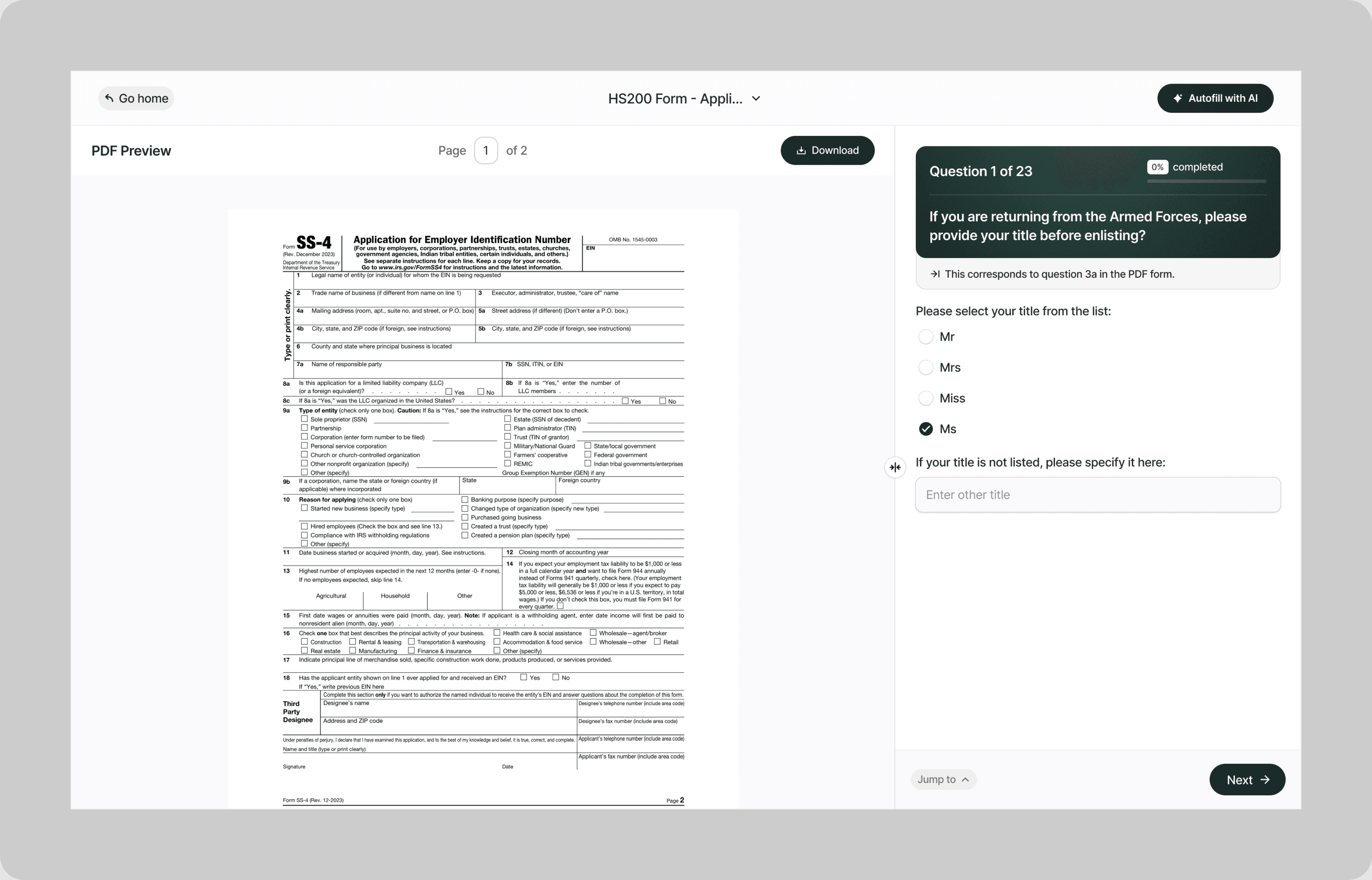
Instead of arriving 30 minutes early to every appointment to fill out the same medical history for the fifth time, or spending your evening deciphering Medicare enrollment instructions instead of resting, our AI reads your healthcare forms and fills them correctly the first time.
Whether you're completing patient intake paperwork, enrolling in Medicare, filing for medical leave, authorizing a medical records release, submitting a prior authorization request, or appealing a denied claim, Simplicity AI handles the paperwork so you can focus on your health.
The Problem with Healthcare Forms
- Every provider, insurer, and government agency uses its own forms with its own terminology and its own field structure
- Forms ask for detailed medical history, medication lists, insurance details, and authorization signatures that most patients can't recall under pressure in a waiting room
- A single missing field on a prior authorization can delay a procedure by weeks
- Medicare, Medicaid, FMLA, and HIPAA each have their own forms, their own rules, and their own consequences for errors
One incomplete form doesn't just create a paperwork delay. It can postpone treatment, deny coverage, forfeit leave protections, or leave you paying out of pocket for a procedure that should have been covered. Simplicity AI removes these barriers by converting any healthcare form into a guided, plain-English experience.
How Simplicity AI Solves It
- Recognizes healthcare form structures across patient intake documents, insurance authorizations, government enrollment forms, medical leave certifications, and provider billing submissions
- Pulls patient details, insurance information, medication lists, and medical history from uploaded documents like insurance cards, prior intake forms, discharge summaries, or explanation of benefits statements
- Maps your information to the correct fields regardless of which provider, insurer, or agency issued the form
- Validates every entry for completeness, date formatting, insurance code accuracy, and consistency across related forms
- Flags missing signatures, incomplete authorization sections, and fields that conflict with information entered elsewhere on the same form
You focus on your health. We handle the forms.
How to Fill Out Healthcare Forms Online Using Simplicity AI
1
Upload your healthcare form PDF to Simplicity AI. The AI scans the document, identifies every field from patient demographics through medical history, insurance details, authorization sections, and signature blocks, and converts it into a guided questionnaire.
2
Enter your personal and insurance details: legal name, date of birth, address, insurance carrier, policy number, group number, and subscriber information. If you've used Simplicity AI before, your details carry over, so you're not rewriting the same information at every new provider.
3
Enter your medical information. Upload prior intake forms, medication lists, discharge summaries, or your insurance card as source documents, and AI pulls diagnoses, medications, allergies, provider names, and insurance data into the correct fields automatically.
4
Complete the form-specific sections. For prior authorizations, enter the procedure, diagnosis codes, and treating provider details. For medical leave, enter the condition, treatment plan, and work capacity assessment. For Medicare enrollment, enter eligibility details and coverage selections. AI shows only the sections relevant to your form type.
5
Review the entire form. AI flags missing fields, unsigned authorization sections, inconsistent insurance details, and incomplete medical history entries before you export.
6
Sign electronically and download your completed form as a clean PDF ready to submit to your provider, insurer, employer, or government agency.
Key Benefits of Using Simplicity AI to Fill Healthcare Forms

Save Time and Effort
Complete multi-page healthcare forms in minutes instead of filling out the same medical history, medication list, and insurance details by hand every time you see a new provider. No more arriving early to appointments just to do paperwork.

Reduce Errors
Catch missing fields, incorrect insurance details, and incomplete medical history entries before you submit. Errors on healthcare forms don't just cause delays; they can also lead to serious consequences. They cause denied claims, rejected authorizations, and bills that should have been covered to land in your mailbox.

Speed Up Approvals
Submit clean, complete prior authorization requests, medical leave certifications, and enrollment forms that reviewers can process without follow-up. The fewer questions your form raises, the faster you get the approval, the coverage, or the leave you need.

Stay Organized
Keep your insurance cards, medical records, medication lists, prior intake forms, and authorization documents in one secure workspace. No more filling out allergy lists from memory or guessing which medications you reported to your last provider.
Start Filling Forms the Smart Way
Stop letting paperwork stand between you and your care. With Simplicity AI, you can complete healthcare forms and other important documents quickly, accurately, and confidently, every time. Try Simplicity AI today and experience stress-free form-filling.
FAQs
Frequently Asked Questions About Filling Insurance Forms with Al
What types of healthcare forms can I fill out with Simplicity AI?
Simplicity AI works with any healthcare form in PDF format. This includes patient intake and registration forms, insurance authorization and prior approval forms, Medicare and Medicaid enrollment forms (CMS L564, CMS-1763, SSA-44), FMLA medical certifications (WH-380-E, WH-380-F), HIPAA authorization and release forms, medical records request forms, explanation of benefits responses, insurance appeal letters, and provider billing submissions. Upload the PDF, and AI converts it into a guided questionnaire.
How do I fill out a healthcare form online for free?
Upload your healthcare form PDF to Simplicity AI. Our platform converts the form into an interactive questionnaire that walks you through each section in plain English. Simply visit our website, upload your form, and follow the prompts to complete it in minutes. Try it for free.
Can AI pull my medical information from prior intake forms?
Yes. Upload prior intake forms, medication lists, discharge summaries, insurance cards, or any document containing your medical and insurance details as a source file. Simplicity AI extracts diagnoses, medications, allergies, insurance policy numbers, and provider information, and automatically populates the correct fields. You review and update, rather than rewriting your entire medical history from memory.
Does Simplicity AI understand medical terminology?
Simplicity AI recognizes medical terms, diagnosis descriptions, and insurance codes commonly found on healthcare forms. When fields require specific medical information (ICD codes, CPT codes, medication names, dosage formats), AI validates the formatting and flags entries that don't match expected patterns. For clinical sections that require a healthcare provider's input, AI identifies those fields and separates them from the patient-completed sections.
Can healthcare providers use Simplicity AI to reduce intake form errors?
Yes. Providers can direct patients to Simplicity AI to complete intake forms before their appointment. Patients upload the practice's intake form, complete it at home with access to their insurance cards and medication bottles, and arrive with the form fully completed. This reduces front desk corrections, speeds up check-in, and improves the accuracy of the information that flows into the patient's record.
How does Simplicity AI handle HIPAA compliance?
Simplicity AI encrypts all documents, handles your data privately, and never shares it with third parties. Healthcare forms contain protected health information (PHI) under HIPAA, and Simplicity AI treats all uploaded medical documents with the same security standards regardless of form type. Your data stays yours.
Can I use Simplicity AI for Medicare enrollment forms?
Yes. Simplicity AI supports Medicare-related forms, including CMS L564 (Request for Employment Information), CMS-1763 (Request for Termination of Medicare Coverage), and SSA-44 (Medicare IRMAA Life-Changing Event). Upload the form, and AI walks you through every section, explains the implications of your selections, and flags missing documentation before you submit.
Common Mistakes When Filling Out Insurance Forms (and How Al Prevents Them)
Wrong or Outdated Insurance Information
You changed insurance plans in January, but the card in your wallet is from last year. You enter the old policy number on your intake form, the provider bills the wrong carrier, the claim gets denied, and you receive a bill for the full amount. Updating your insurance card is your responsibility, but Simplicity AI prompts you to verify your carrier name, policy number, and group number against your current card before the form is finalized.
Incomplete Medication Lists
Your provider asks you to list all current medications, including dosages and frequencies. You remember three of the five you take daily, but you forget the eye drops and the supplement your cardiologist prescribed. An incomplete medication list creates drug interaction risks, incorrect treatment decisions, and gaps in your medical record that follow you from provider to provider. Simplicity AI prompts for each medication individually and flags when the list appears unusually short compared to the conditions you've reported elsewhere on the form.
Missing or Incorrect Diagnosis Codes on Authorization Forms
Prior authorization forms require specific ICD-10 diagnosis codes to justify the requested procedure or medication. An incorrect, missing, or non-matching code gives the insurer grounds to deny the authorization. Simplicity AI validates ICD code formatting and flags when the diagnosis description doesn't align with the code entered.
Leaving HIPAA Authorization Fields Blank
Medical records release forms and HIPAA authorization documents require specific details: who is authorized to receive the information, what information is being released, the purpose of the release, and an expiration date. Leaving any of these fields blank means the receiving party can't legally obtain your records. Simplicity AI flags every required field on HIPAA authorization forms and won't generate the final PDF until the authorization is complete.
Submitting FMLA Certification Without the Provider's Section Completed
Form WH-380-E has two parts: the employee's section and the healthcare provider's section. Submitting the form with only the employee's section completed doesn't satisfy the employer's certification requirement. Your employer sends it back, you lose days off your 15-day deadline, and your leave approval gets delayed. Simplicity AI separates the employee and provider sections and flags when the provider's portion is incomplete.
Not Updating Medical History After a New Diagnosis
You completed an intake form a year ago listing your conditions at the time. Since then, you've been diagnosed with two additional conditions, started new medications, and had a procedure. If you submit the same outdated medical history to a new provider, they're making clinical decisions based on incomplete information. Simplicity AI prompts you to review and update your medical history each time you complete a new form rather than carrying forward outdated entries.
Filing Medicare Enrollment After the Special Enrollment Period Closes
If you delayed Medicare Part B because you had employer coverage, you have an 8-month Special Enrollment Period after that coverage ends to enroll without a penalty. Miss that window, and you wait until the General Enrollment Period (January through March), coverage doesn't start until July, and you pay a 10% premium surcharge for every 12-month period you could have enrolled but didn't. That penalty is permanent. Simplicity AI helps you complete the CMS L564 and Medicare enrollment forms quickly, so the paperwork isn't the reason you miss the window.
Using a Generic Doctor's Note Instead of the Required Form
A letter from your physician saying "Patient is under my care" doesn't satisfy the requirements for FMLA certification, prior authorization, disability claims, or insurance appeals. Each of these has a specific form with specific fields that must be completed by the provider. Submitting a generic note instead of the required form means the receiving party rejects it and asks for the actual form, burning time you may not have. Simplicity AI ensures you're filling out the correct form from the start rather than submitting documentation that doesn't meet the requirements.

Immigration form ai filler
POPULAR FORMS
Popular forms ready for you to fill Instantly
Find commonly used government, legal, and official documents, already optimized for fast, stress-free filling with Simplicity AI. We’ve made them easier, smarter, and faster so you can move on with your day.
Tax Forms
Immigration Forms
Healthcare Forms
Employment Forms
Legal Forms
Motor Vehicle Forms
Experience instant PDF form filling with AI
