
USE CASES / EMPLOYMENT AI FORM FILLER
Fill Employment Forms Faster and Without the Back-and-Forth
Simplicity AI helps employees, employers, and HR departments complete employment forms accurately in minutes, so onboarding never stalls over paperwork.
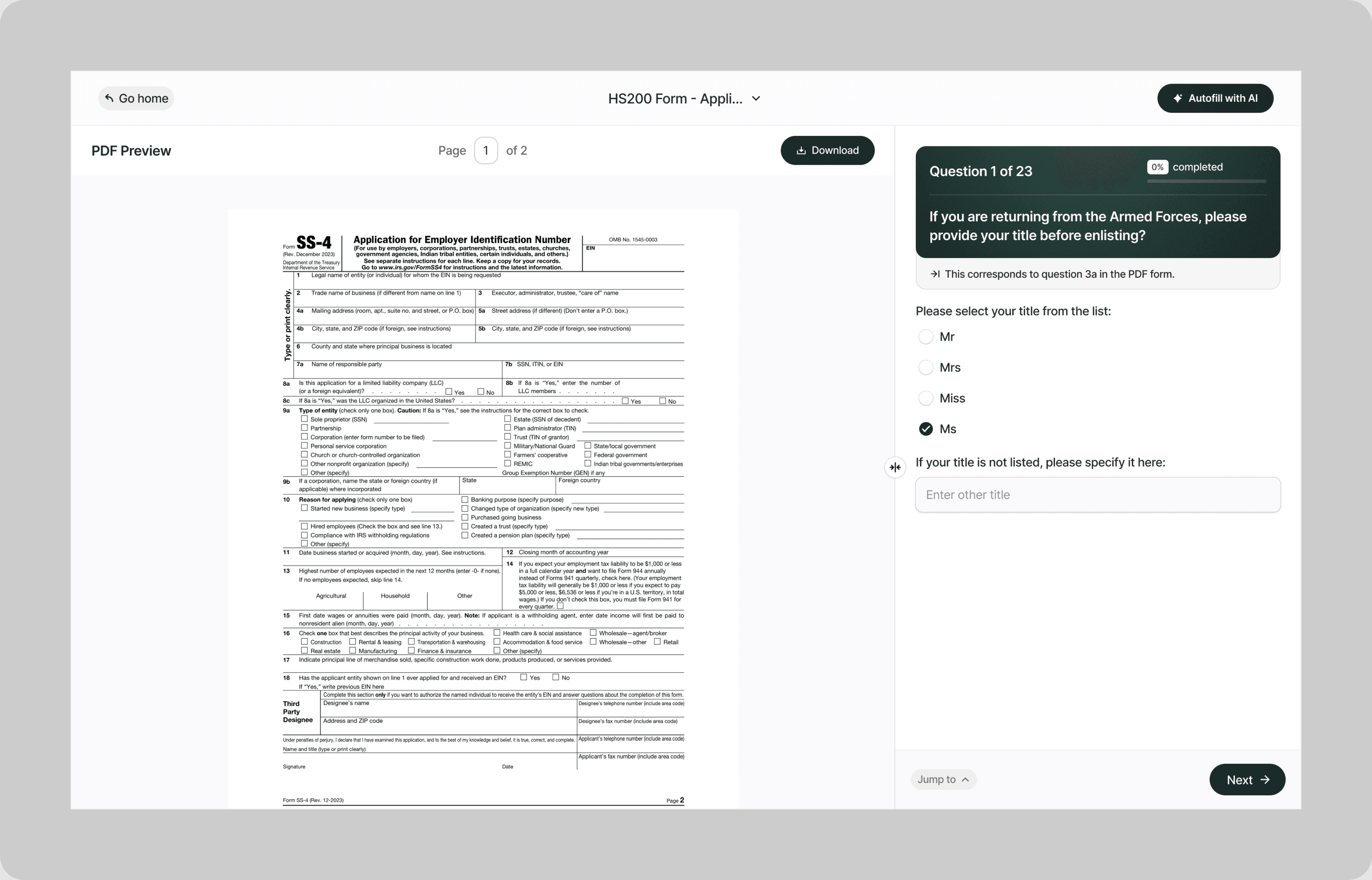
Instead of chasing new hires for missing signatures, correcting mismatched tax withholding entries, and manually verifying that every field is complete before filing, our AI reads your employment forms and fills them correctly the first time.
Whether you're onboarding a new employee, verifying work eligibility, updating tax withholdings, processing a termination, or documenting a workplace accommodation, Simplicity AI handles the paperwork so you can focus on the people.
The Problem with Employment Forms
- New hires face a stack of forms on day one with no context for what each form does or why it matters
- HR teams spend more time chasing incomplete forms than actually onboarding
- A single error on a W-4 or I-9 can trigger IRS penalties or DOL violations
- Forms change annually, and using last year's version creates compliance gaps
One incomplete or incorrect form doesn't just slow down onboarding. It exposes the company to fines, audit flags, and legal liability. Simplicity AI eliminates these risks by converting any employment form into a guided, error-proof experience.
How Simplicity AI Solves It
- With Simplicity AI, employment paperwork is no longer the bottleneck in your hiring process. Our AI:
- Recognizes employment form structures across federal, state, and company-specific formats
- Pulls employee details, tax information, and eligibility data from uploaded documents like offer letters, prior W-4s, or identification records
- Maps answers to the correct fields regardless of which form version or jurisdiction you're working in
- Validates every entry for completeness, formatting, and regulatory compliance
- Flags missing signatures, expired documents, and fields that don't match across related forms
You focus on building your team. We handle the paperwork.
How to Fill Out Employment Forms Online Using Simplicity AI
1
Upload your employment form PDF to Simplicity AI. The AI scans the document, identifies every field from employee information through tax withholdings, eligibility verification, and authorization signatures, and converts it into a guided questionnaire.
2
Enter the employee's personal details: legal name, address, Social Security number, date of birth, and contact information. If the employee has used Simplicity AI before, their details carry over automatically.
3
Complete the form-specific sections. For tax forms, enter filing status and withholding elections. For eligibility forms, enter citizenship status and document details. For benefits enrollment, select coverage options and add dependents. AI walks through each section in plain English with no jargon.
4
Upload supporting documents as source files, such as offer letters, identification documents, prior-year tax forms, or benefits summaries. AI populates relevant details into the correct fields, so no one has to retype information already on paper.
5
Review the entire form. AI flags missing fields, unsigned sections, expired document dates, and inconsistencies between related forms before you export.
6
Sign electronically and download the completed form as a clean PDF ready for the employee file, payroll processing, or regulatory submission.
Key Benefits of Using Simplicity AI to Fill Employment Forms

Save Time and Effort
Complete onboarding packets in minutes, not days. No more printing stacks of forms, handing them to new hires with zero guidance, and chasing them for corrections the following week.

Reduce Errors
Catch missing fields, incorrect withholding calculations, and unsigned authorization sections before they become compliance problems. Clean forms pass audits. Incomplete forms trigger penalties.

Accelerate Onboarding
Get new hires from offer letter to fully processed on day one. The faster the paperwork is completed correctly, the sooner they're productive and payroll runs without issues.

Stay Organized
Keep all employee forms, supporting documents, and verification records in a single secure workspace. No more filing cabinets full of paper I-9s or email threads with W-4 attachments buried in someone's inbox.
Start Filling Forms the Smart Way
Stop losing onboarding time to paperwork bottlenecks. With Simplicity AI, you can complete employment forms and other important documents quickly, accurately, and confidently, every time. Try Simplicity AI today and experience stress-free form-filling.
FAQs
Frequently Asked Questions About Filling Insurance Forms with Al
What types of employment forms can I fill out with Simplicity AI?
Simplicity AI works with any employment form in PDF format. This includes W-4 federal tax withholding, I-9 employment eligibility verification, state tax withholding forms, direct deposit authorizations, benefits enrollment forms, emergency contact forms, confidentiality agreements, handbook acknowledgments, and any company-specific onboarding documents. Upload the PDF, and AI converts it into a guided questionnaire.
How do I fill out an employment form online for free?
Upload your employment form PDF to Simplicity AI. Our platform converts the form into an interactive questionnaire that walks you through each section in plain English. Simply visit our website, upload your form, and follow the prompts to complete it in minutes. Try it for free.
Can AI pull employee information from an offer letter or prior forms?
Yes. Upload an offer letter, a prior year's W-4, identification documents, or any file containing the employee's details as a source document. Simplicity AI extracts names, addresses, Social Security numbers, start dates, and compensation details, and automatically populates the correct fields.
How does AI handle different state tax withholding forms?
Every state has its own withholding form with its own field structure, exemption rules, and filing requirements. Simplicity AI recognizes each state's form format and maps the employee's withholding elections to the correct fields. If the employee works in a different state from where they live, AI prompts apply to both jurisdictions.
Can HR teams use Simplicity AI for bulk onboarding?
Yes. HR departments that onboard multiple employees can upload a standardized form set and process each new hire's paperwork, including their personal details. Simplicity AI stores company-level information (employer name, EIN, address, plan details) across all forms, so HR only enters it once.
How does Simplicity AI help with I-9 compliance?
The I-9 has strict completion deadlines (Section 1 by the first day of employment, Section 2 within three business days) and specific document requirements. Simplicity AI walks employees through Section 1 in plain English, flags missing or incomplete fields, and prompts employers to verify acceptable documents for Section 2 before the deadline.
Is my data safe when filling out employment forms on Simplicity AI?
Yes. Employment forms contain highly sensitive data, including Social Security numbers, bank account details, tax returns, immigration documents, and medical information. Simplicity AI encrypts all documents, handles your data privately, and never shares it with third parties. Your data stays yours.
Common Mistakes When Filling Out Insurance Forms (and How Al Prevents Them)
Incomplete I-9 Section 2 Within the Three-Day Window
The employee completes Section 1 on their first day. The employer has three business days to review original identification documents and complete Section 2. Miss that window and the company is out of compliance with federal immigration law, even if the employee is fully authorized to work. Fines start at $252 per form and scale up for repeat violations. Simplicity AI tracks Section 1 completion and prompts the employer to finalize Section 2 before the deadline.
Wrong Withholding Elections on the W-4
The 2020 W-4 redesign eliminated allowances and replaced them with a multi-step process involving income adjustments, deductions, and dependent credits. Many employees still estimate the numbers or leave steps blank, resulting in either too much or too little federal tax withheld. When they file their return, they either owe a large balance or they've given the government an interest-free loan all year. Simplicity AI walks through each step of the W-4 with plain-English explanations so employees make informed elections.
Mismatched State and Federal Withholding Forms
An employee completes the federal W-4 as single with no adjustments, then completes the state form as married with three exemptions. Payroll runs both, and the employee ends up owing state taxes at year-end because the withholdings didn't align with their actual filing status. Simplicity AI flags inconsistencies between federal and state withholding elections, allowing the employee to reconcile them before both forms are sent to payroll.
Missing Signatures on Authorization Forms
Direct deposit authorizations, benefits enrollment forms, handbook acknowledgments, and background check consents all require signatures. A form without a signature cannot be processed. HR sends it back, the employee takes three days to return it, and payroll or benefits enrollment gets delayed. Simplicity AI highlights every signature field and won't generate the final PDF until all required signatures are completed.
Using Expired or Outdated Form Versions
The W-4 changes. The I-9 changes. State withholding forms change. Benefits enrollment forms change every plan year. Using last year's version results in missing required fields, references outdated exemption rules, or submits a form that the system no longer accepts. Always upload the most current version to Simplicity AI to ensure compliance.
Entering the Wrong Employer Information
The new hire completes 12 forms and enters the company name slightly differently on 3 of them. One says "ABC Corp," another says "ABC Corporation," and a third says "ABC Corp LLC." Now the I-9, the W-4, and the state form don't match, which can trigger processing delays or audit questions. Simplicity AI locks employer details across all forms in a packet, so the company name, EIN, and address are consistent everywhere.
Not Completing Benefits Enrollment Within the Eligibility Window
Most employers give new hires 30 days from their start date to enroll in health insurance, dental, vision, and other benefits. If the employee misses the window, they must wait until the next open enrollment period, which could be months away. Some employees don't realize the deadline exists until it's passed. Simplicity AI can't track your employer's enrollment deadlines, but it helps you complete and export the benefits forms the same day, so the paperwork isn't the reason you miss the window.
Leaving Emergency Contact Information Blank
It may seem like a minor form, but if there's a workplace accident and HR can't reach anyone because the emergency contact form was never completed, the consequences can be serious. Many employees skip it or fill in outdated information. Simplicity AI includes emergency contact forms in the onboarding flow and prompts for complete details, including name, relationship, phone number, and alternate contact.

Job application ai form filler
Legal form ai filler
POPULAR FORMS
Popular forms ready for you to fill Instantly
Find commonly used government, legal, and official documents, already optimized for fast, stress-free filling with Simplicity AI. We’ve made them easier, smarter, and faster so you can move on with your day.
Tax Forms
Immigration Forms
Healthcare Forms
Employment Forms
Legal Forms
Motor Vehicle Forms
Experience instant PDF form filling with AI
